

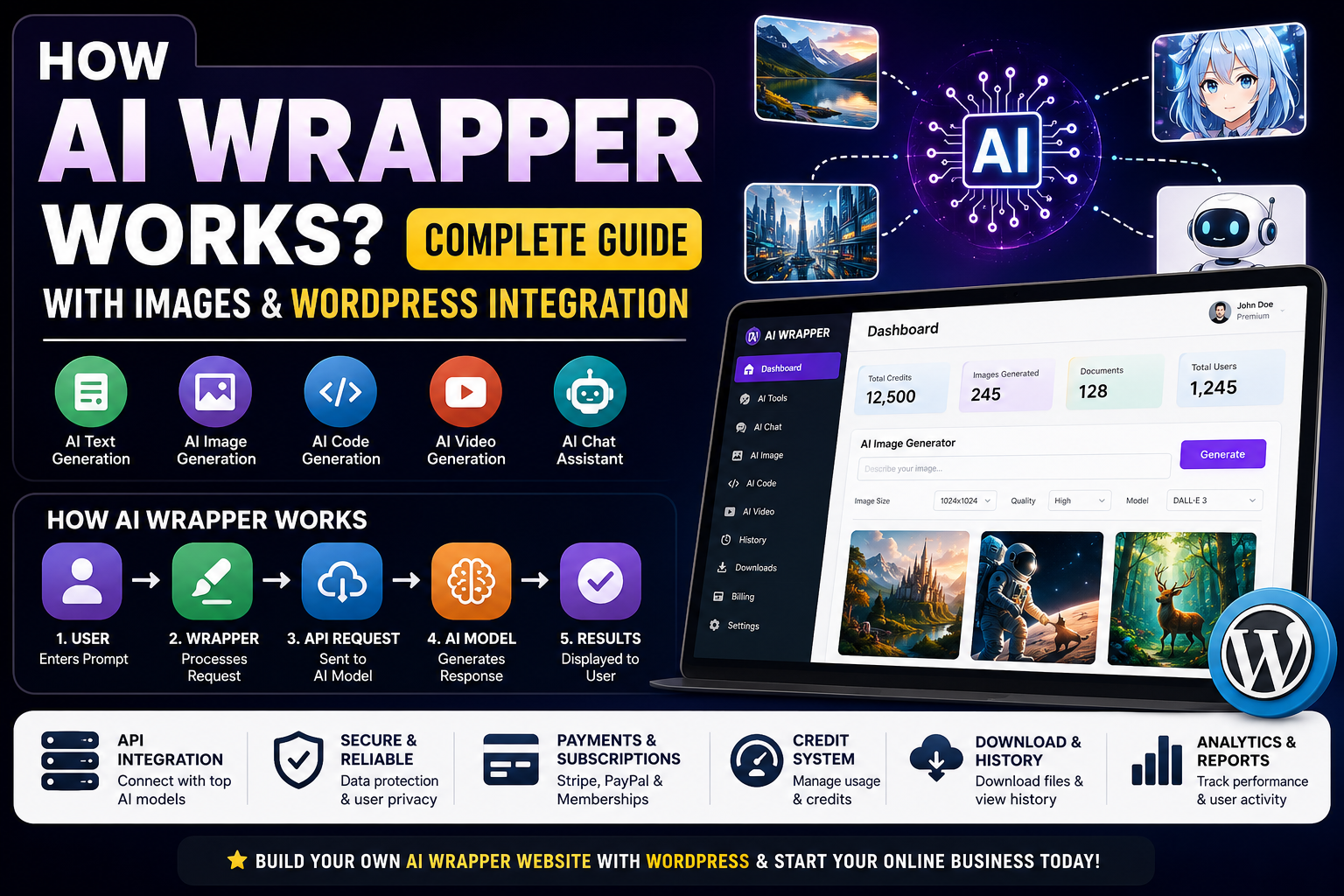
Artificial Intelligence (AI) has become one of the fastest-growing technologies on the internet. Thousands of websites and applications are now using AI to generate text, images, code, videos, and answers. However, many successful AI websites are not building their own AI models. Instead, they use something called an AI Wrapper.
In this article, we will explain what an AI wrapper is, how it works, its complete architecture, how AI image generation works inside an AI wrapper, and how you can build an AI wrapper website using WordPress.
What is an AI Wrapper?
An AI wrapper is a software application or website that uses existing AI models through APIs and presents them in a user-friendly interface.
Instead of creating an AI model from scratch, developers use APIs provided by AI companies and build additional features such as:
- User accounts
- AI chatbots
- AI image generators
- AI writing tools
- Image editors
- AI code generators
- Subscription plans
- Payment gateways
- WordPress integration
- Download functionality
- Usage tracking
Examples
Popular AI wrappers include:
- AI writing assistants
- AI image generators
- AI coding assistants
- AI SEO tools
- AI resume builders
- AI thumbnail generators
- AI video generators
The AI wrapper acts as a bridge between users and AI models.
How AI Wrappers Work?
The complete workflow is very simple.
User
↓

Website/App Interface
↓

AI Wrapper Backend
↓

API Request
↓

AI Model
↓

Generated Response
↓

Backend Processing
↓

Display Results
↓

Download or Share
Step 1: User Enters Prompt
Examples:
Write a blog post.

Generate an anime image.

Create a logo.

Remove image background.

Generate YouTube thumbnail.
The user’s prompt is sent to the AI wrapper.
Step 2: AI Wrapper Processes the Request
The wrapper performs multiple tasks:
- User authentication
- Credits calculation
- Prompt optimization
- Content moderation
- Subscription validation
- API selection
Example:
Prompt:

Generate a futuristic city wallpaper.

↓

AI Wrapper

↓

Checks:

User Login?
Subscription Active?
Credits Available?
Image Size?
Language?
After validation, the request moves to the AI model.
Step 3: API Communication
The wrapper communicates with AI models through APIs.
Website
↓

Backend Server
↓

API Request
↓

AI Provider
↓

Generated Results
↓

Website
↓

User
The API usually receives:
Prompt

Image Size

Quality

Model Selection

Language

User Information
Example:
Generate:

"A futuristic cyberpunk city"

Size:

1024x1024

Model:

Image Generator

Quality:

High
The AI model processes the request and sends back the generated output.
How AI Image Wrappers Work?
AI image wrappers follow a slightly different workflow.
User Prompt
↓

AI Image Wrapper
↓

Image Generation API
↓

AI Model Processing
↓

Generate Image
↓

Save Image
↓

Optimize Image
↓

Display Preview
↓

Download Button
Example
User enters:
Create a gaming thumbnail.

↓

AI Wrapper

↓

API Request Sent

↓

AI Generates Image

↓

Image Returned

↓

Compression Applied

↓

Watermark Removed (if premium)

↓

Preview Generated

↓

Download Available
Features include:
- Image generation
- Background removal
- Image enhancement
- Upscaling
- Face restoration
- Cartoon effects
- AI avatars
- Anime images
- Thumbnail generation
- Logo creation
AI Wrapper Website Architecture
                  USERS
                     |
                     |
                 FRONTEND
                     |
        --------------------------------
        |              |               |
      Login          Chat            Images
        |              |               |
      Dashboard      History         Downloads
                     |
                  BACKEND
                     |
        --------------------------------
        |              |               |
       APIs         Database          Payments
        |              |               |
     AI Models       Users            Plans
        |              |               |
      Images         Tokens           Reports
                     |
                AI Providers
                     |
          ------------------------
          |          |            |
        Text        Image         Code
          |          |            |
      Results      Results       Results
                     |
                  WEBSITE
                     |
                   USERS
AI Wrapper Features
Modern AI wrappers include:
AI Writing
- Blog generator
- SEO articles
- Product descriptions
- Scripts
- Emails
- Social media posts
AI Images
- Image generation
- AI avatars
- Anime art
- Background removal
- Logo generation
- Thumbnail creator
AI Video
- Video generation
- Short videos
- Motion graphics
- Video enhancement
AI Coding
- HTML
- CSS
- JavaScript
- PHP
- Python
- Android code generation
AI SEO
- Meta titles
- Meta descriptions
- Keyword suggestions
- Schema markup
How Images are Managed?
AI wrappers generally follow this workflow:
Generate Image
↓

Temporary Storage
↓

Image Compression
↓

Optimization
↓

CDN Upload
↓

Database Entry
↓

Preview Creation
↓

Downloads Enabled
↓

Image History Saved
Information stored:
User ID

Prompt

Date

Image Size

Downloads

Image Path

Credits Used

Subscription Type
AI Wrapper Monetization
Popular monetization methods include:
Free Plans
Users receive:
- Limited credits
- Watermarked images
- Basic features
Premium Plans
Features:
- Unlimited generation
- HD downloads
- Priority processing
- Premium models
Credit System
Examples:
1 Blog = 5 Credits

1 Image = 10 Credits

1 Video = 25 Credits

1 Logo = 5 Credits
Building an AI Wrapper Using WordPress
WordPress is one of the easiest ways to build an AI wrapper website.
Required Components
WordPress

↓

Theme

↓

AI Plugin

↓

API Integration

↓

Membership System

↓

Payment Gateway

↓

User Dashboard

↓

AI Tools

↓

Downloads System

↓

Analytics
Required Features
- User Login
- AI Dashboard
- Subscription Plans
- Download Manager
- Payment System
- User History
- AI Chat
- Image Generator
- Usage Tracking
- Analytics
WordPress AI Wrapper Workflow
Visitor

↓

Login/Register

↓

Select AI Tool

↓

Enter Prompt

↓

API Processing

↓

Generate Results

↓

Save User History

↓

Display Results

↓

Download Images

↓

Credits Updated
Database Structure
Users Table

↓

ID
Name
Email
Credits
Plan
Status

---------------------

Images Table

↓

Prompt
Image URL
Downloads
Created Date

---------------------

Payments Table

↓

Transaction ID
Plan Name
Amount
Status

---------------------

History Table

↓

Generated Results
Downloads
Credits Used
Security Features
Every AI wrapper should include:
- SSL Security
- Rate Limiting
- Login Protection
- API Restrictions
- Spam Protection
- Firewall
- Usage Monitoring
- Credit Validation
- Payment Verification
SEO Optimization
WordPress AI wrappers should implement:
- Schema Markup
- SEO Titles
- Meta Descriptions
- XML Sitemaps
- Fast Loading
- Image Optimization
- Mobile Optimization
- Lazy Loading
- Caching
SEO improves rankings and helps attract organic traffic.
Suggested Images for This Article
You can add the following images to improve engagement:
- AI Wrapper Architecture Diagram.
- AI Workflow Illustration.
- AI Image Generation Process.
- WordPress AI Wrapper Dashboard.
- Subscription Plan Comparison.
- API Communication Diagram.
- AI Credits Management System.
- User Login Workflow.
- Image Download System.
- AI Monetization Flowchart.
Advantages of AI Wrappers
- Faster development
- Lower costs
- Scalable architecture
- Subscription-based earnings
- Better user experience
- Easy WordPress integration
- Multiple AI tools support
- Easy monetization
Challenges
Developers should also consider:
- API costs
- Server expenses
- Credit management
- Security
- Abuse prevention
- Payment failures
- SEO competition
- High traffic management
Proper planning and optimization are essential for building a successful AI wrapper platform.
Final Thoughts
AI wrappers have transformed the way developers build intelligent applications. Instead of spending years creating machine learning models, developers can integrate existing AI capabilities and focus on delivering better user experiences. Whether it’s AI writing, image generation, coding assistance, or automation, AI wrappers provide a fast and scalable solution.
WordPress makes it even easier to launch an AI wrapper website by combining user management, payments, SEO tools, and API integrations within a single platform. With the right architecture, security measures, and monetization strategy, an AI wrapper website can become a powerful and profitable online business.
If you are planning to build an AI-powered platform, understanding how AI wrappers process requests, generate images, manage credits, and integrate with WordPress is the first step toward creating a scalable and user-friendly solution.
