

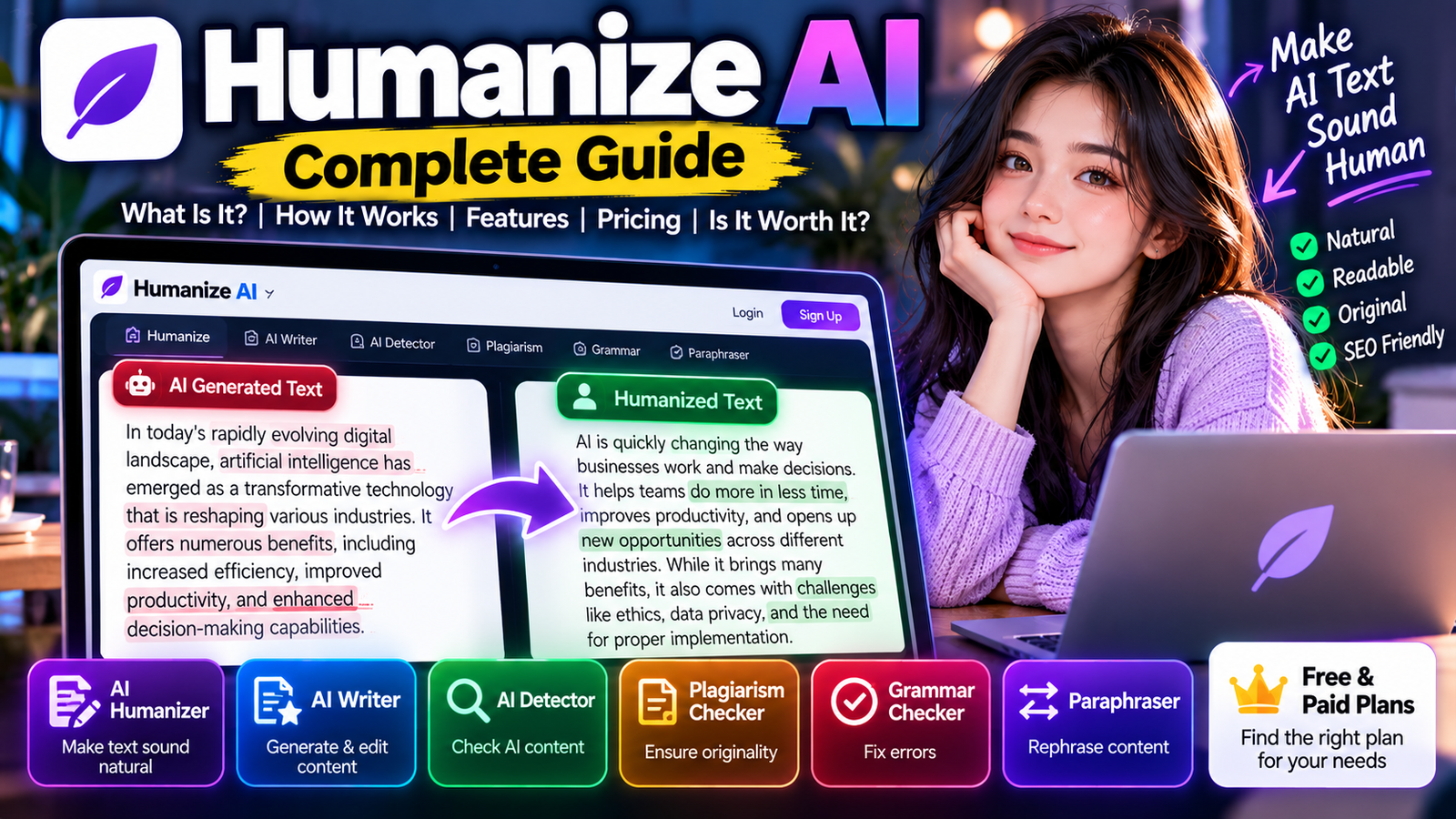
AI writing tools have become a normal part of creating content. Whether you’re writing a blog post, an essay, an email, a product description, or a social media caption, tools like ChatGPT, Claude, and Gemini can spit out a usable first draft in seconds.
The problem? AI-generated writing can sometimes feel repetitive, overly polished, or just… not like the way a real person actually writes.
That’s where Humanize AI comes in.
Humanize AI is an AI writing platform built to rewrite AI-generated text so it sounds more natural and easier to read. Alongside its humanizer, the platform offers tools for AI writing, AI detection, plagiarism checking, grammar correction, and paraphrasing.
In this guide, we’ll look at what Humanize AI is, how it works, its main features, who can use it, pricing, pros and cons, and whether it’s actually worth trying.
What Is Humanize AI?
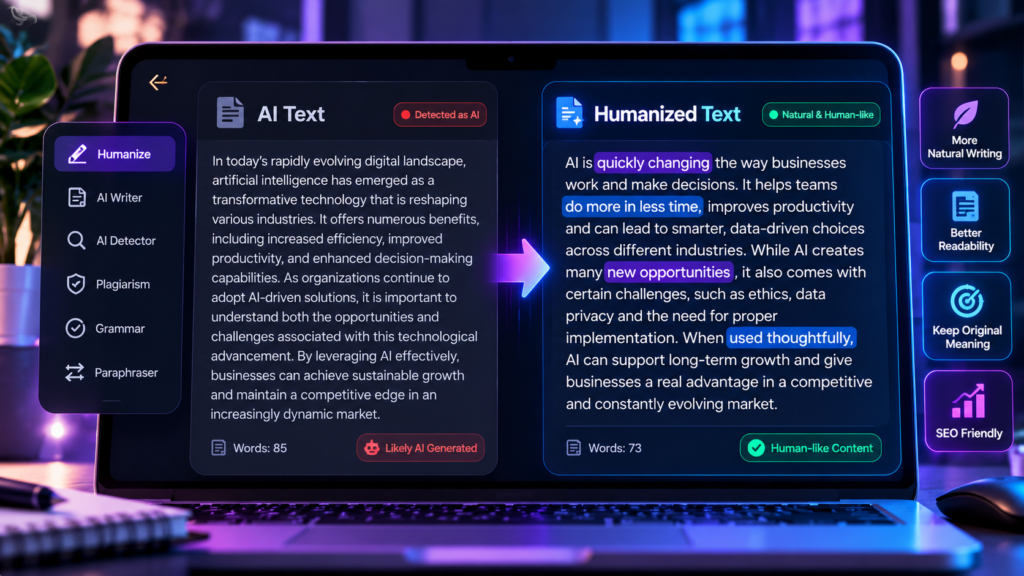
Humanize AI is an online writing tool that focuses on turning AI-generated text into writing that feels more natural and human-like.
The basic idea is simple: you paste in text generated by an AI writing assistant, and Humanize AI rewrites it while trying to preserve the original meaning.
According to its documentation, the Humanize AI feature can work with text generated by ChatGPT, Claude, Gemini, and other AI writing assistants.
This can be useful when the original AI output sounds too formal, repetitive, or generic.
Rather than just swapping a few words with synonyms, an AI humanizer typically tries to change sentence structure, wording, rhythm, and overall readability.
The goal isn’t necessarily to make every sentence complicated. In many cases, good human writing is actually simpler.
How Does Humanize AI Work?
Using Humanize AI is pretty straightforward.
You generally start by taking text generated by an AI tool and dropping it into the humanizer.
The tool then analyzes the text and produces a rewritten version.
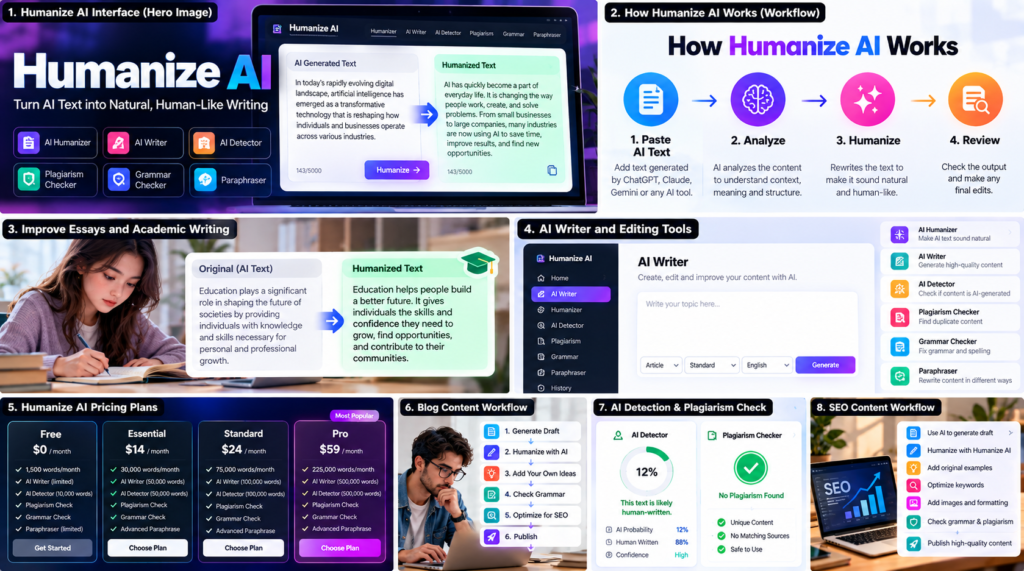
A typical workflow looks like this:
AI-generated text → Paste into Humanize AI → Humanize → Review → Edit → Publish
The platform’s documentation describes the process as pasting AI-generated content into the tool and clicking the Humanize button. The rewritten version is meant to preserve the original ideas while making the writing more natural.
The important part is the final review.
Even when an AI humanizer produces a better draft, you should still read the result yourself. A human editor can catch awkward wording, incorrect facts, missing context, and sentences that don’t match the intended audience.
What Can Humanize AI Be Used For?
There are plenty of situations where a humanizer can be useful.
Blog Posts
Bloggers can use Humanize AI to improve the readability of AI-assisted drafts before publishing them.
For example, a first AI draft might have long introductions and repeated phrases. Reworking the text can make it more direct and easier to follow.
Essays and Academic Writing
Students may use AI tools while brainstorming or creating first drafts. Humanize AI can help make the resulting writing sound less mechanical.
However, students should always follow their school’s or university’s rules about AI-assisted work.
Emails
AI-generated emails can sometimes sound too formal.
A humanizer can help turn a robotic-looking message into something that feels more conversational.
Marketing Content
Marketers can use AI to generate initial copy and then refine the wording for a specific audience.
This can be especially useful for product descriptions, landing pages, advertisements, and social media content.
Website Content
Website owners can use humanization tools as part of their editing workflow.
The important thing is to prioritize useful information and originality rather than just trying to make text look different.
Humanize AI Features
HumanizeAI.com is more than a single rewriting tool. Its current platform combines several writing-related features.
Here are some of the main ones.
1. AI Humanizer
The main feature is the AI humanizer.
It’s designed to rewrite AI-generated text into a more natural-sounding version while keeping the main message intact.
This is useful when an AI draft is technically correct but doesn’t sound like something you’d normally write.
2. AI Writer
Humanize AI also offers an AI Writer for generating and editing content.
This means users can potentially move from generating a draft to editing and refining it without switching between multiple services.
The paid plans include different monthly limits for AI-generated words.
3. AI Detector
Another feature is AI detection.
The platform provides AI detection allowances that vary depending on the plan. For example, its current pricing page lists 10,000 AI detection words per month for the Free plan and higher limits for paid plans.
AI detection shouldn’t be treated as absolute proof that a piece of writing was or wasn’t generated by AI. Detection systems can produce inaccurate results.
4. Plagiarism Checker
Humanize AI also includes a plagiarism-checking feature.
This can be useful when editing content because humanizing text doesn’t automatically make the underlying information original.
Changing the wording of copied material doesn’t turn it into original work.
A plagiarism check should therefore be treated as a separate step in the writing process.
5. Grammar Checker
The platform includes grammar-checking capabilities as well.
This is useful after rewriting because changes to sentence structure can occasionally introduce grammatical mistakes.
A good workflow is:
Generate → Humanize → Grammar Check → Fact Check → Final Edit
6. AI Paraphraser
Humanize AI also provides paraphrasing functionality.
Paraphrasing is slightly different from humanization.
A paraphraser focuses on expressing existing information differently, while a humanizer is primarily intended to make AI-generated writing feel more natural.
The two tools can therefore have overlapping but different purposes.
Humanize AI Free Plan
Humanize AI currently offers a Free plan.
According to its pricing page, the Free plan includes:
- 1,500 HumanizeAI words per month
- Up to 300 words per humanization process
- AI Writer access with a monthly allowance
- AI detection
- Plagiarism checking
- Grammar checking
- Limited paraphrasing features
The exact limits and features can change, so it’s worth checking the pricing page before subscribing.
The free version is mainly useful for people who want to test the platform before paying for a larger monthly allowance.
Humanize AI Pricing
Humanize AI currently lists several subscription levels.
The pricing page lists the following monthly prices:
| Plan | Price | HumanizeAI Words |
|---|---|---|
| Free | $0/month | 1,500/month |
| Essential | $14/month | 30,000/month |
| Standard | $24/month | 75,000/month |
| Pro | $59/month | 225,000/month |
The paid plans also increase allowances for AI writing, AI detection, plagiarism checking, and other tools.
Pricing can change, and annual billing may offer different effective pricing, so users should verify the current amount on the official pricing page before purchasing.
Is Humanize AI Free?
Yes, Humanize AI has a free plan.
However, the free plan is limited compared with the paid subscriptions.
For someone who only occasionally needs to rewrite a short AI-generated passage, the free plan may be enough.
Someone producing thousands of words every week will likely need a paid plan because the monthly humanization allowance is much higher on the paid tiers.
Humanize AI for Bloggers
For bloggers, an AI humanizer can be useful as part of an editing process.
Imagine you generate a 2,000-word article with an AI assistant.
Instead of publishing the first output immediately, you could:
- Generate the initial draft.
- Check the facts.
- Humanize sections that sound repetitive.
- Add your own experience or examples.
- Improve headings and formatting.
- Add original images.
- Check grammar.
- Review the article manually.
- Publish the final version.
This approach is much more useful than treating a humanizer as a magic button that automatically creates a perfect article.
Does Humanize AI Make AI Writing Sound Human?
It can make AI-generated writing sound more natural, but the result depends on the original text and the type of rewriting performed.
For example, consider a sentence like:
“In today’s rapidly evolving digital landscape, artificial intelligence has emerged as a transformative technology.”
That sentence is grammatically fine, but it has the kind of generic phrasing that appears frequently in AI-generated content.
A more natural version could be:
“AI has quickly become part of the way people work, write, and create online.”
The second sentence is shorter and more conversational.
Humanization is essentially about making writing feel appropriate for the person and audience who will actually read it.
Can Humanize AI Bypass AI Detectors?
This is one of the biggest reasons people search for AI humanizers.
Some Humanize AI services market their products around reducing AI-detection signals, and HumanizeAI.com describes its humanizer as a way to make AI-generated content sound naturally written.
However, it’s important not to treat AI detectors as perfect.
Different detectors can give different results for the same text. A human-written article can sometimes be flagged, while AI-generated text may sometimes pass a detector.
For that reason, trying to guarantee a particular detector result is not a reliable writing strategy.
A better goal is to create genuinely useful, accurate, and original content.
Humanize AI vs ChatGPT
Humanize AI and ChatGPT have different primary purposes.
ChatGPT is a general-purpose AI assistant that can generate, explain, summarize, brainstorm, and edit content.
Humanize AI is more specialized around rewriting and improving AI-generated writing, while also providing additional writing tools.
If you need to brainstorm an article from scratch, a general AI assistant may be more useful.
If you already have an AI-generated draft and want to work specifically on its wording and naturalness, a dedicated humanizer can be useful.
Humanize AI vs AI Paraphrasing Tools
A traditional paraphrasing tool usually focuses on changing the wording of a piece of text.
Humanization has a slightly different objective.
Instead of simply replacing words with synonyms, a humanization workflow may modify sentence structure, transitions, tone, and phrasing.
That distinction matters because replacing every word with a synonym can actually make writing worse.
Natural writing doesn’t come from using the most complicated vocabulary.
It comes from using the right words for the situation.
Is Humanize AI Good for SEO?
Humanize AI can be useful as part of an SEO content workflow, but humanization itself is not an SEO strategy.
Search engines care about the usefulness and quality of a page.
If you take an AI-generated article, run it through a humanizer, and publish it without adding anything useful, simply changing the wording doesn’t automatically make the article valuable.
For SEO, focus on:
- Original information
- Accurate facts
- Clear structure
- Search intent
- Helpful explanations
- Relevant examples
- Good internal linking
- Original images
- Strong titles and descriptions
- A good user experience
Humanize AI can be one part of the editing process rather than the entire strategy.
Advantages of Humanize AI
There are several reasons someone might want to try Humanize AI.
Easy workflow
The basic process is simple: paste your content, humanize it, review the result, and continue editing.
Multiple writing tools
The platform combines humanization with AI writing, detection, plagiarism checking, grammar checking, and paraphrasing.
Free option
Users can try the service without immediately purchasing a subscription.
Useful for AI-assisted workflows
If you regularly use AI for drafting, a dedicated editing tool can help you spend less time manually rewriting repetitive sections.
Different subscription levels
The paid plans offer different word allowances, which can make it easier to choose a plan based on how much content you produce.
Disadvantages of Humanize AI
No AI writing tool is perfect.
Humanization can change meaning
When a tool rewrites text, there’s always a possibility that the meaning or emphasis changes slightly.
That’s why important content should be reviewed after processing.
AI detection is not perfect
You shouldn’t assume that a detector score is an objective measurement of whether something is genuinely human-written.
Paid plans can become expensive for heavy users
The higher-tier plans cost considerably more than the entry-level subscription.
Human editing is still important
A humanizer cannot replace fact-checking, personal experience, expert knowledge, or editorial judgment.
Who Should Use Humanize AI?
Humanize AI may be useful for:
- Bloggers
- Content creators
- Students, where AI use is permitted
- Freelance writers
- Marketers
- Website owners
- Businesses
- Researchers
- People editing AI-assisted drafts
It’s especially useful when someone already has a draft but feels that the writing sounds too mechanical.
Who May Not Need Humanize AI?
You probably don’t need a dedicated humanizer if you already write naturally and prefer editing everything yourself.
You may also not need one if your AI workflow already includes extensive manual editing.
The value depends on how much time the tool actually saves you.
How to Use Humanize AI Properly
If you decide to use Humanize AI, don’t just paste an entire article into the tool and publish whatever comes out.
A better process is:
Step 1: Create the first draft
Use your preferred writing method.
This can be your own writing or AI-assisted drafting, depending on your needs and the rules that apply to your work.
Step 2: Remove unnecessary information
Delete repetitive paragraphs before humanizing the article.
Step 3: Humanize selected sections
Focus on sections that sound particularly robotic or repetitive.
Step 4: Review the output
Read every paragraph.
Look for changes in meaning, awkward phrases, and incorrect information.
Step 5: Add your own perspective
This is one of the most important steps.
Add examples, experiences, opinions, screenshots, original research, or other information that makes the article genuinely yours.
Step 6: Fact-check
A humanizer does not automatically verify whether claims are true.
Step 7: Run your final checks
Use grammar and plagiarism checks where appropriate, then perform a final manual edit.
Is Humanize AI Worth It?
Whether Humanize AI is worth paying for depends mainly on how often you need it.
If you occasionally have a short AI-generated draft, the free version may be enough to test the workflow.
If you regularly produce large amounts of content, the larger paid plans provide substantially higher monthly humanization limits and additional writing tools.
The biggest benefit is convenience.
Instead of manually rewriting every sentence that sounds robotic, you can use a humanizer as a first editing pass and then make the final changes yourself.
Final Thoughts
Humanize AI is designed for people who want to make AI-assisted writing sound more natural.
Its main humanizer is supported by a wider collection of writing tools, including AI writing, AI detection, plagiarism checking, grammar checking, and paraphrasing.
It can be useful for bloggers, marketers, students, writers, and anyone who regularly works with AI-generated drafts.
But there’s an important distinction between humanizing text and creating genuinely human content.
Changing the wording is only one part of good writing.
The strongest content still needs original ideas, accurate information, useful examples, a clear point of view, and human editing.
For that reason, Humanize AI works best as an editing assistant rather than a replacement for the person behind the content.
Humanize AI FAQ
What is Humanize AI?
Humanize AI is a writing tool designed to rewrite AI-generated text so it sounds more natural and human-like. HumanizeAI.com also provides AI writing, AI detection, plagiarism checking, grammar checking, and paraphrasing tools.
Is Humanize AI free?
Yes. HumanizeAI.com offers a Free plan with limited monthly usage. Its current pricing page lists 1,500 HumanizeAI words per month on the Free plan.
How does Humanize AI work?
You paste AI-generated content into the tool, start the humanization process, and receive a rewritten version intended to sound more natural while preserving the original ideas.
Can Humanize AI work with ChatGPT text?
Yes. Its documentation says the Humanize AI feature can work with content generated by ChatGPT, Claude, Gemini, and other AI writing assistants.
Does Humanize AI guarantee that text will pass AI detectors?
No AI detector result should be treated as guaranteed. Detection systems can produce false positives and different systems can produce different results.
Is Humanize AI good for blog posts?
It can be useful for editing AI-assisted blog drafts, particularly when sections sound repetitive or unnatural. However, bloggers should still fact-check, edit, and add original information before publishing.
Does Humanize AI check plagiarism?
Yes. HumanizeAI.com includes plagiarism checking, with the available word allowance depending on the subscription plan.
Does Humanize AI have an AI detector?
Yes. AI detection is included in the platform, with different monthly limits depending on the plan.
How much does Humanize AI cost?
The current HumanizeAI.com pricing page lists Free, Essential at $14/month, Standard at $24/month, and Pro at $59/month. Pricing and plan details can change.
Is Humanize AI worth using?
It can be worthwhile if you regularly edit AI-generated drafts and want to speed up the rewriting process. For occasional use, the free plan may be sufficient.
Should I publish Humanize AI output without editing?
No. Always review the result. Humanization can change wording and occasionally affect meaning, so final human editing and fact-checking are important.
