

Homework can be a real drag when you’re stuck on one question and have no idea where to start. A tough math equation, a confusing science concept, or a long reading assignment can turn a quick study session into hours of frustration.
That’s where an AI homework helper can actually be useful.
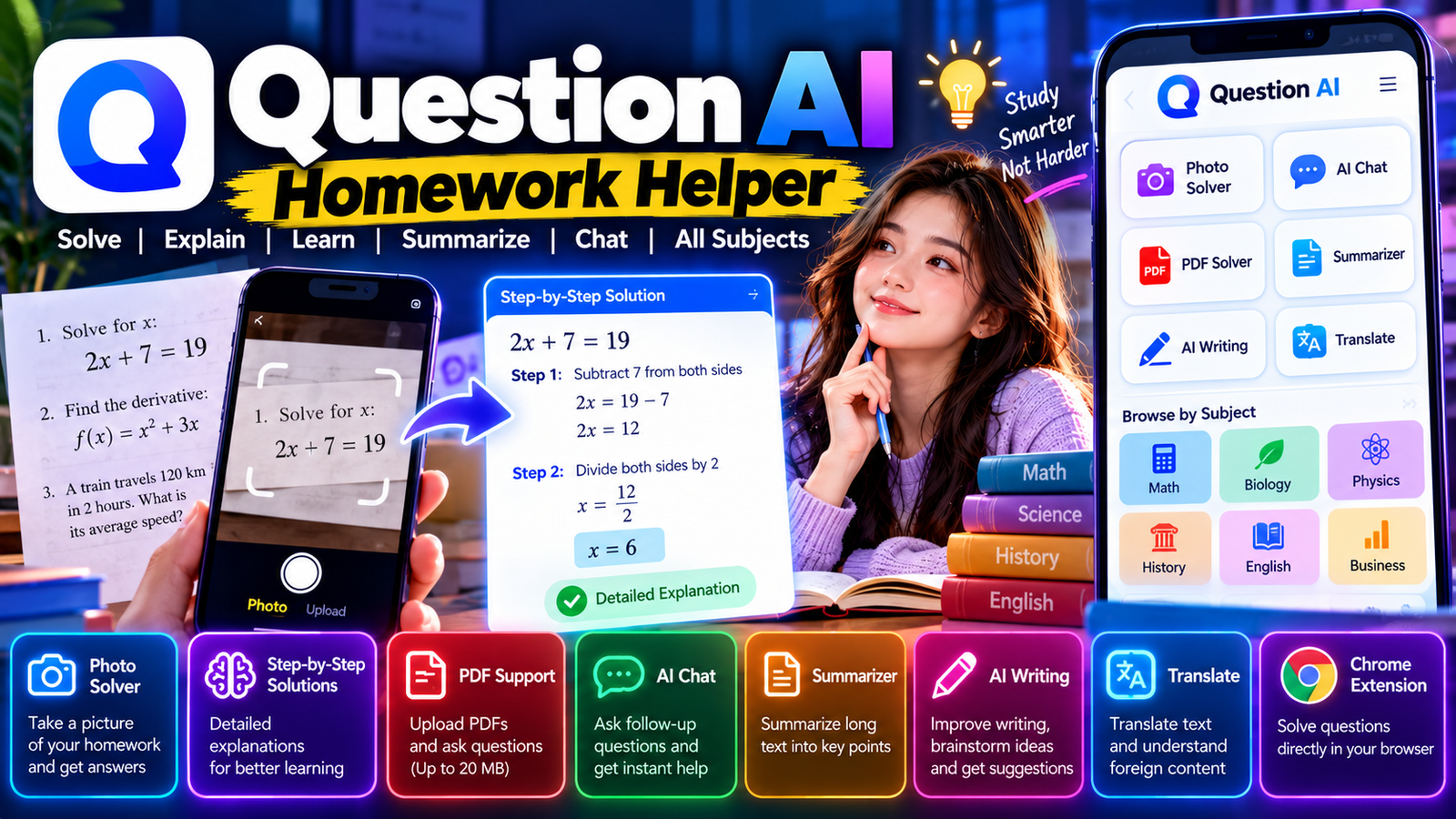
Question AI Homework Helper is an AI-powered study tool that answers questions, solves homework problems, explains solutions, summarizes text, and helps you study. One of its standout features is the ability to snap a picture of a question and get an AI-generated solution.
Question AI says it’s been used by more than 10 million users, and its official website highlights photo-based problem solving, AI chat, PDF analysis, and summarization.
In this guide, we’ll go through what Question AI Homework Helper is, how it works, its main features, the photo solver, math solver, AI chat, PDF tools, mobile apps, Chrome extension, free access, accuracy, and how to use it effectively for studying.
What Is Question AI Homework Helper?
Question AI Homework Helper is an AI-powered homework and study assistant that helps you find answers and understand academic questions.
Instead of typing every question manually, you can use the photo-solving feature to capture a problem and let the AI analyze it.
For example, if your textbook has a complicated math equation, you can take a picture of it and upload it. Question AI then processes the image and gives you an answer with an explanation.
The official Question AI website describes its service as a homework helper that can solve problems, answer questions, summarize text, and provide AI chat.
The platform isn’t just for math either. Question AI lists subjects like Math, Biology, History, Social Science, English, and Business among its study areas.
That makes it more of a general study assistant rather than just a math calculator.
How Does Question AI Homework Helper Work?
The basic idea is simple.
You give Question AI a question—either by typing it or providing an image—and the AI analyzes the information before generating a response.
A typical workflow looks like this:
Question → Upload or Take a Photo → AI Analysis → Answer → Explanation
Question AI’s official app page specifically promotes solving problems by taking a picture and getting detailed step-by-step explanations.
This can save time when the original question contains equations, symbols, diagrams, or a lot of text that would be annoying to type manually.
The important part, though, is to actually read the explanation. Using an AI homework helper just to copy an answer doesn’t teach you much. Understanding the method is what makes the tool useful for studying.
Question AI Photo Homework Solver
One of the main reasons students use Question AI is its photo homework solver.
Instead of typing a question, you can take a picture of it.
This is especially handy for:
- Math equations
- Algebra problems
- Geometry questions
- Science worksheets
- Multiple-choice questions
- Textbook exercises
- Word problems
- Printed homework
- Study notes
Question AI describes its photo-solving feature as a way to snap a picture of a problem and get an answer quickly, along with detailed explanations.
The quality of the result depends on the image. A clear, well-lit photo is much easier for an AI system to understand than a blurry or partially cropped picture.
How to Use Question AI Homework Helper With a Photo
Using the photo solver usually involves just a few steps.
Step 1: Open Question AI
Open the Question AI website or mobile app.
Step 2: Capture the Question
Take a clear picture of the homework problem.
Step 3: Check the Image
Make sure the complete question is visible.
Step 4: Submit It
Let Question AI analyze the problem.
Step 5: Read the Solution
Review the answer and the explanation.
Step 6: Ask a Follow-Up Question
If something doesn’t make sense, ask the AI to explain that particular step.
That last step is especially useful.
Instead of saying “give me the answer,” you can ask:
“Why did you use this formula?”
or
“Explain this step in simple words.”
That turns the tool into more of a study assistant.
Question AI Math Homework Helper
Math is one of the most common reasons students look for an AI homework helper.
Question AI has a dedicated math homework section and promotes photo-based math problem solving.
It can be used for questions involving equations, algebra, functions, calculations, and other mathematical problems.
For example, consider:
2x + 7 = 19
A useful solution would explain:
Step 1: Subtract 7 from both sides.
2x = 12
Step 2: Divide both sides by 2.
x = 6
The final answer is useful, but the steps are more important if you’re trying to learn the process.
Question AI’s official app page says its problem solver provides detailed step-by-step explanations.
Question AI for Algebra Homework
Algebra problems can get tricky when several operations are combined.
Question AI can help break these problems into smaller steps.
For example, instead of only asking for the value of x, you can ask the tool to explain:
- Which operation should be performed first?
- Why can a number be moved to the other side?
- How do you simplify the equation?
- How do you check the final answer?
This makes the AI more useful for learning algebra rather than just getting a result.
Question AI for Science Homework
Question AI isn’t limited to math.
The platform lists subjects including Biology, History, Social Science, English, and Business, alongside Math.
Students can use it to understand topics like:
- Biology
- Chemistry
- Physics
- History
- Social studies
- English
- Business
For example, you could upload a biology worksheet and ask the AI to explain an unfamiliar term.
You could also ask it to summarize a difficult science concept in simpler language.
Question AI Homework Chat
Question AI also includes an AI chat feature.
This is useful when you don’t want a single answer but have several follow-up questions.
For example:
Student: What is photosynthesis?
AI: Photosynthesis is the process…
Student: Explain it like I’m new to biology.
AI: Plants use light energy to…
Student: What are the main things required?
The conversation can continue from there.
The official Question AI website lists AI Chat as one of its core features and says users can upload PDF files through the chat experience.
This conversational approach can be really helpful when you’re preparing for a test.
Question AI Step-by-Step Homework Solutions
A good homework helper shouldn’t just tell you the final answer.
It should help you understand how the answer was reached.
Question AI promotes detailed step-by-step explanations as part of its problem-solving feature.
For example:
Problem:
Find the area of a rectangle with a length of 12 cm and width of 5 cm.
Step 1: Use the rectangle area formula.
Area = Length × Width
Step 2: Substitute the numbers.
Area = 12 × 5
Step 3: Calculate.
Area = 60 cm²
The student can then use the same method on another problem.
That’s much more useful than simply memorizing “60.”
Question AI PDF Homework Helper
Another useful feature is PDF support.
Question AI provides a ChatPDF tool that lets you upload a PDF and interact with its contents.
The current official page lists a 20 MB maximum PDF size and says users can chat with AI about an uploaded document, get summaries, and ask questions about it.
This can be useful for:
- Textbooks
- Lecture notes
- Study guides
- Research papers
- Worksheets
- Class handouts
- Revision material
For example, instead of reading a 50-page study document just to find one definition, you could ask the AI about that specific topic.
Question AI Homework Summarizer
Long study material isn’t always easy to review.
Question AI includes a summarization feature designed to make large amounts of text easier to understand.
A summary can help identify:
- Main ideas
- Important definitions
- Key events
- Important arguments
- Major concepts
- Important examples
Students can use summaries as a revision aid before an exam.
However, summaries shouldn’t completely replace the original material when the details matter.
Question AI Homework Helper for English
English students can use Question AI for questions involving reading, writing, grammar, vocabulary, and comprehension.
For example, you could ask:
- What does this paragraph mean?
- Explain this word.
- Summarize this chapter.
- Identify the main idea.
- Explain the author’s argument.
- Help me understand this sentence.
The platform lists English among its supported subject areas.
Question AI Homework Helper for History
History homework often involves remembering names, dates, events, causes, and consequences.
Question AI can help explain these relationships.
For example, instead of asking only:
“When did this event happen?”
you can ask:
“Why did this event happen, and what were its major consequences?”
That produces a more useful learning experience.
Question AI lists History among its study subjects.
Question AI Writing Tool
Question AI also offers AI writing capabilities.
Its official app page lists AI Writing as one of its features.
Students may use writing assistance for:
- Brainstorming
- Outlining
- Drafting
- Rewriting
- Improving wording
- Understanding how to structure an essay
However, there’s an important distinction between using AI to learn and using AI to submit work.
If your school or university requires an assignment to be completed independently, you should follow those rules.
Question AI Creative Idea Generator
Sometimes the hardest part of an assignment is simply getting started.
Question AI includes a creative idea generator that can help with brainstorming.
You might use it for:
- Essay topics
- Science projects
- Presentation ideas
- Story ideas
- Research topics
- Business projects
The best approach is to use the suggestions as a starting point and then develop the idea yourself.
Question AI Translation for Students
Question AI also includes translation functionality.
This can be helpful when studying material written in another language.
For example, a student could translate a paragraph and then ask the AI to explain its meaning.
Translation can be especially helpful for language students and people working with international sources.
Question AI Chrome Extension
Question AI also has a Chrome extension designed for studying online.
Its official extension page describes features like:
- One-click solutions
- Screenshot-based question solving
- Q&A-style problem solving
The extension is designed to work across multiple learning platforms.
This means students can get help without necessarily leaving the webpage they’re studying.
The visual solver also allows users to capture a question directly from a webpage.
Question AI Homework Helper App
Question AI is available on mobile as well as desktop.
The official apps page lists versions for:
- Android
- iPhone
- Chrome
The mobile apps advertise daily free solutions and instant photo answers with explanations.
This is particularly useful for students because smartphones already have a camera.
Instead of manually typing a complicated question, you can simply take a picture.
Question AI Android App
The Android version is designed for students who want homework assistance on their phones.
A typical workflow is:
Open App → Take Photo → Submit Question → Read Solution → Ask Follow-Up
Question AI’s official apps page confirms that the Android app offers photo answers with explanations and additional daily free solutions.
Question AI iPhone App
Question AI also offers an iPhone version.
The iPhone app provides the same general idea: use AI to help answer questions and solve homework problems, including image-based questions.
The official apps page currently lists the iPhone version alongside the Android and Chrome products.
Is Question AI Homework Helper Free?
Yes, Question AI offers free access.
Its official website describes its homework helper features as free, while the apps also advertise daily free solutions.
However, free access doesn’t necessarily mean every feature or usage level is unlimited.
Some features may have limits or require an upgrade depending on the current account and product.
If you’re an occasional user, the free version may be enough.
If you use the service heavily every day, you may encounter usage restrictions.
Question AI Homework Helper Pricing
Question AI has offered paid subscription options alongside its free features.
The exact pricing and limits can vary depending on the platform, billing option, region, and current promotion.
For that reason, it’s better to check the price shown on the official Question AI checkout or subscription page before purchasing.
Question AI also provides a help center covering subscription cancellation, refunds, plan upgrades, and payment issues.
The main reason to consider a paid plan would generally be higher usage or access to features that aren’t included in the free experience.
Question AI Homework Helper for Exam Preparation
Question AI can also be useful before an exam.
Instead of waiting until you’re completely stuck, you can use it during revision.
For example:
Step 1: Upload your notes.
Step 2: Ask the AI to summarize the important concepts.
Step 3: Ask questions about difficult topics.
Step 4: Request practice questions.
Step 5: Solve them yourself.
Step 6: Use Question AI to check your understanding.
This creates a much better learning loop than simply asking for answers.
Can Question AI Solve Homework From Pictures?
Yes.
Photo-based homework solving is one of Question AI’s main features.
The official app page says users can snap a picture of a problem and receive an answer with a detailed step-by-step explanation.
This can be especially useful for mathematical equations because typing them manually can be time-consuming.
Can Question AI Solve Multiple Questions?
Question AI’s official website says it can handle multiple questions simultaneously and describes there as being no stated limit on the number of questions it can handle at once.
Actual usage can still depend on the account, feature, or current service limits.
If you’re working through a large worksheet, it can therefore be useful to break the work into smaller sections and check the solutions carefully.
Is Question AI Accurate?
Question AI’s official extension promotes a 99% accuracy claim for its problem-solving system.
However, no AI homework tool should be considered perfect.
AI can make mistakes.
Problems can occur when:
- The image is blurry
- Part of the question is missing
- The question is ambiguous
- A diagram is difficult to interpret
- Advanced calculations are involved
- The question requires information not included in the prompt
So even if the answer looks convincing, it’s a good idea to verify important work.
How to Get Better Answers From Question AI
The quality of the input can make a big difference.
Take a Clear Photo
Make sure the question is readable.
Include the Full Problem
Don’t crop out important instructions.
Avoid Reflections
Glare can make text difficult to recognize.
Ask for Steps
Instead of asking only for the final answer, ask for a detailed explanation.
Ask Follow-Up Questions
If you don’t understand something, ask the AI to explain it differently.
Verify Important Answers
Especially before submitting graded work.
Question AI Homework Helper vs ChatGPT
Question AI and ChatGPT can both answer homework questions, but their focus is different.
| Feature | Question AI Homework Helper | ChatGPT |
|---|---|---|
| Homework solving | Yes | Yes |
| Photo question solving | Yes | Yes |
| Math help | Yes | Yes |
| AI chat | Yes | Yes |
| PDF analysis | Yes | Yes |
| Summarization | Yes | Yes |
| Dedicated homework workflow | Yes | General-purpose |
| Chrome extension | Yes | Different tools available |
| Mobile apps | Yes | Yes |
| General productivity | More limited | Broad |
Question AI is more specifically positioned as a study and homework assistant.
ChatGPT is a broader AI assistant that can handle homework alongside writing, coding, research, planning, brainstorming, and many other tasks.
Question AI Homework Helper vs Photomath
Photomath is primarily focused on mathematics.
Question AI covers a wider range of subjects and combines homework solving with AI chat, PDF tools, summarization, writing, translation, and other features.
If you only need help with mathematics, a dedicated math solver may be enough.
If you want one tool for different school subjects, Question AI may be more convenient.
Question AI Homework Helper vs Google Gemini
Google Gemini is a general-purpose AI assistant that can also answer educational questions.
Question AI is more specifically designed around homework and studying.
That difference can matter if you want features like photo-based homework solving, study-focused tools, and a dedicated homework workflow.
Advantages of Question AI Homework Helper
Photo Solving
You can photograph a question instead of typing it manually.
Step-by-Step Explanations
The platform promotes detailed explanations rather than just final answers.
Multiple Subjects
Question AI supports subjects including Math, Biology, History, Social Science, English, and Business.
AI Chat
You can ask follow-up questions and continue the conversation.
PDF Support
You can upload PDFs and ask questions about their contents.
Summarization
Long study material can be condensed into easier-to-review information.
Mobile Apps
Question AI offers Android and iPhone apps.
Chrome Extension
The browser extension can help solve questions while studying online.
Disadvantages of Question AI Homework Helper
No homework AI is perfect.
AI Can Make Mistakes
A confident-looking answer can still be wrong.
Poor Images Can Cause Errors
A blurry photograph may result in an incorrect interpretation.
Free Usage Can Have Limits
Heavy users may need additional access depending on the current plan.
It Can Become a Shortcut
If students use it only to copy answers, they may miss the learning process.
Academic Rules Still Apply
Schools and universities can have their own policies about AI-assisted work.
Is Question AI Homework Helper Safe to Use?
Question AI is designed as an educational tool, but students should still use it responsibly.
Avoid entering sensitive personal information into any online AI service unless you understand how that information is handled.
Students should also follow the rules of their school or university.
If an assignment must be completed independently, using AI to generate the entire submission may violate the assignment rules.
A better approach is:
Try → Get Help → Understand → Practice
Use Question AI when you get stuck, then solve another similar problem yourself.
How Students Should Use Question AI Homework Helper
The best way to use an AI homework helper isn’t to ask:
“Give me the answer.”
Instead, ask:
“Show me how to solve this step by step.”
Then ask:
“Why did you use this formula?”
And finally:
“Give me another problem like this so I can practice.”
This approach makes the tool much more useful as a learning assistant.
Is Question AI Homework Helper Worth It?
For students who frequently need help with homework, Question AI can be a useful tool.
Its biggest advantage is convenience.
You can take a picture of a question, receive an explanation, ask follow-up questions, summarize study material, or interact with a PDF.
The official platform currently promotes photo problem solving, AI chat, summarization, PDF analysis, writing, translation, and other study tools.
For occasional homework questions, the free features may be enough.
For frequent users, a paid option may make sense if the additional usage or features justify the cost.
The best way to decide is to try the free experience first.
Final Thoughts
Question AI Homework Helper is designed to make studying and homework easier by combining AI question answering, photo-based problem solving, explanations, chat, summarization, and document analysis in one platform.
Its photo solver is particularly useful because students don’t have to manually type complicated questions. They can take a picture and let the AI analyze it.
The platform also supports multiple academic subjects, mobile apps, a Chrome extension, AI chat, and PDF analysis.
But the most important thing is how you use it.
If you use Question AI simply to copy answers, you’re getting the least educational value from the tool.
If you use it to understand difficult concepts, check your work, ask follow-up questions, and practice similar problems, it can become a useful study companion.
In other words, Question AI Homework Helper works best when you use AI to learn the answer—not just to get the answer.
Question AI Homework Helper FAQ
What is Question AI Homework Helper?
Question AI Homework Helper is an AI-powered study tool that can answer questions, solve homework problems, analyze images, summarize text, and help students understand difficult topics.
Is Question AI Homework Helper free?
Yes. Question AI provides free homework and study features, although some usage or premium options may have limits.
Can Question AI solve homework from a picture?
Yes. Its photo-solving feature lets users take a picture of a problem and receive an AI-generated answer with a detailed explanation.
Can Question AI solve math homework?
Yes. Question AI has a dedicated math homework section and supports photo-based math problem solving.
Does Question AI show steps?
Yes. Question AI promotes detailed step-by-step explanations for its problem-solving feature.
Can Question AI help with science homework?
Yes. The platform lists Biology and other academic subjects among its supported areas.
Does Question AI support PDFs?
Yes. Its ChatPDF feature allows users to upload PDFs and ask questions about them. The current page lists a 20 MB maximum file size.
Does Question AI have an Android app?
Yes. Question AI’s official apps page lists an Android app with photo answers and explanations.
Does Question AI have an iPhone app?
Yes. Question AI also offers an iPhone app.
Does Question AI have a Chrome extension?
Yes. Its Chrome extension offers features including one-click solutions and screenshot-based question solving.
Can Question AI summarize textbooks?
Yes. Question AI includes a summarizer designed to help users understand and condense text from different subjects.
Is Question AI accurate?
Question AI’s extension advertises a 99% accuracy claim, but AI systems can still make mistakes. Important homework and exam answers should be checked independently.
Can Question AI help with essays?
Yes. Question AI lists AI Writing among its available tools. Students should still follow their school’s rules regarding AI-generated assignments.
Is Question AI better than ChatGPT for homework?
It depends on what you need. Question AI is specifically built around homework and study assistance, while ChatGPT is a broader general-purpose AI assistant.
Is Question AI better than Photomath?
If you mainly need mathematics, Photomath may be attractive because it is specialized for math. Question AI covers more subjects and combines homework solving with chat, PDFs, summarization, and other tools.
Can Question AI solve multiple questions?
The official website says Question AI can handle multiple questions simultaneously, although practical usage can depend on the current service and account limits.
Should students use Question AI to complete assignments?
Students should follow their school’s or university’s AI policies. The best use is as a study assistant: understand the solution, learn the method, and then complete the work yourself where required.
